Hand-eye coordination is the brain’s ability to use what the eyes see to guide accurate movement — hands, arms, and often the whole body. In early learning settings, it shows up everywhere: cutting, drawing, building, catching, pouring, buttoning, and using classroom tools.
Head Start describes fine motor development as using the small muscles of the hands to grasp and manipulate objects and tools, and notes that as children gain hand-eye coordination they can direct finger/hand/wrist movements for more complex tasks like drawing fine details or stringing small beads.
If you’re here for hand eye coordination games, you’re likely trying to solve real classroom friction: kids who get frustrated with scissors, avoid ball play, rush and miss targets, or struggle to coordinate what they see with what they do.
This guide gives you:
- quick eye hand coordination activities (3–7 minutes) that actually fit the school day
- center-ready eye and hand coordination games you can reuse all year
- hand eye coordination games online that are active (not just clicking)
- simple ways to observe progress without turning play into a test
What Counts as Hand-Eye Coordination in the Classroom?
Think in three classroom-friendly layers:
1. Tracking + timing
Can the child’s eyes follow a moving object and can their body match the timing? (Bubbles, balloons, scarves.)
2. Targeting + accuracy
Can they move their hand/body to the right spot? (Tossing to a bucket, hitting a dot, placing stickers on a line.)
3. Tool control (visual-motor integration)
Can they control a tool based on what they see? (Scissors on a line, tracing, tweezers, lacing.)
Why it matters: visual-motor integration (VMI) is commonly treated as a key component of handwriting skill, and a meta-analysis identified a moderate relationship (r = 0.29) between handwriting and VMI across 29 studies.
A practical way to explain this to families is to use everyday milestones. CDC’s 4-year milestones include “catches a large ball most of the time,” and 5-year milestones include “buttons some buttons.”
How to run these as micro-games (so you’ll actually use them)
The trick is not a perfect activity, it’s a repeatable routine.
- Set a timer for 4 minutes
- Pick one game
- Repeat it 2–3 times a week
- Make it slightly harder by changing only one variable: distance, speed, target size, or tool
That’s how “practice” happens without kids feeling practiced.
Build Skills Through Play
AR games designed with therapists — for children with ADHD, ASD, DCD, and more. Just a laptop camera. No downloads.
Try Free for 14 DaysBest Hand Eye Coordination Games (Gross Motor, Low Prep)
These are whole-group winners. They build tracking, timing, and aiming without needing a lot of equipment.
1) Balloon Tap Challenge
Keep one balloon in the air using open palms. Level up: right hand only, tap + clap, or tap then name a color.
2) Scarf Catch
Toss a scarf and catch it (slow fall = quick success). Level up: one-hand catch or add a gentle turn.
3) Bubble Pop Patterns
Blow bubbles and call: “Pop two fast, then one slow.” Level up: “Pop only bubbles above your head.”
4) Beanbag Target Toss
Toss beanbags into buckets/hoops at different distances. Level up: label targets 1–5; aim for the called number.
5) Roll-and-Catch
Roll a large ball back and forth before throwing. Level up: bounce pass → gentle underhand toss.
6) Wall Dot Touch
Stick colored dots on the wall and call: “Blue, red, yellow.” Level up: hit the dot with a soft ball instead of touching.
7) Balloon Tennis
Paper-plate paddles + balloon. Level up: partner rally; call forehand/backhand.
8) Ring Toss
Aiming + force control. Level up: increase distance; switch to smaller rings.
9) Freeze and Hit
Kids lightly toss a beanbag; when music stops, freeze mid-action. Why it helps: timing + inhibition + control.
10) Target Walk
Tape shapes on the floor; kids step on the called shape. Level up: toss a beanbag onto the shape before stepping.
Eye Hand Coordination Activities (Tabletop, Fine Motor Centers)
These build cutting/writing readiness and calmer center engagement.
11) Tweezer Rescue
Use tweezers to move pom-poms from “pond” to “bucket.” Level up: sort by color, count, place onto ten-frames.
12) Clothespin Clip Cards
Clip the correct answer on a card (match/count/letters). Level up: clip with “thumb up” grip only.
13) Sticker Pathways
Draw lines/roads; kids place stickers along the path. Level up: narrow the path; add curves.
14) Hole Punch + Thread
Punch holes along a line, then lace yarn through. Level up: alternate colors; follow a pattern.
15) Bead Stringing Station
Large beads → smaller beads progression. This maps directly to Head Start’s example of increasing complexity like stringing small beads as hand-eye coordination develops.
16) Pom-Pom Drop
Drop pom-poms into a narrow-neck bottle using fingers or tongs. Level up: smaller opening.
17) Q-tip Painting
Dot paint letters/shapes. Level up: connect-the-dots pictures.
18) Build and Copy Block Cards
Kids copy a simple block model (3–6 blocks). Level up: more steps; add symmetry.
19) Mini-Puzzle Hunt
Hide puzzle pieces in a sensory bin; kids find and place. Level up: use tongs to retrieve pieces.
20) Paper-Ball Flick Goals
Flick a paper ball into a taped goal on a table. Level up: narrower goal; longer distance.
See It In Action
Book a free demo and see how WonderTree works for your child, classroom, or therapy center.
Book a Free Demo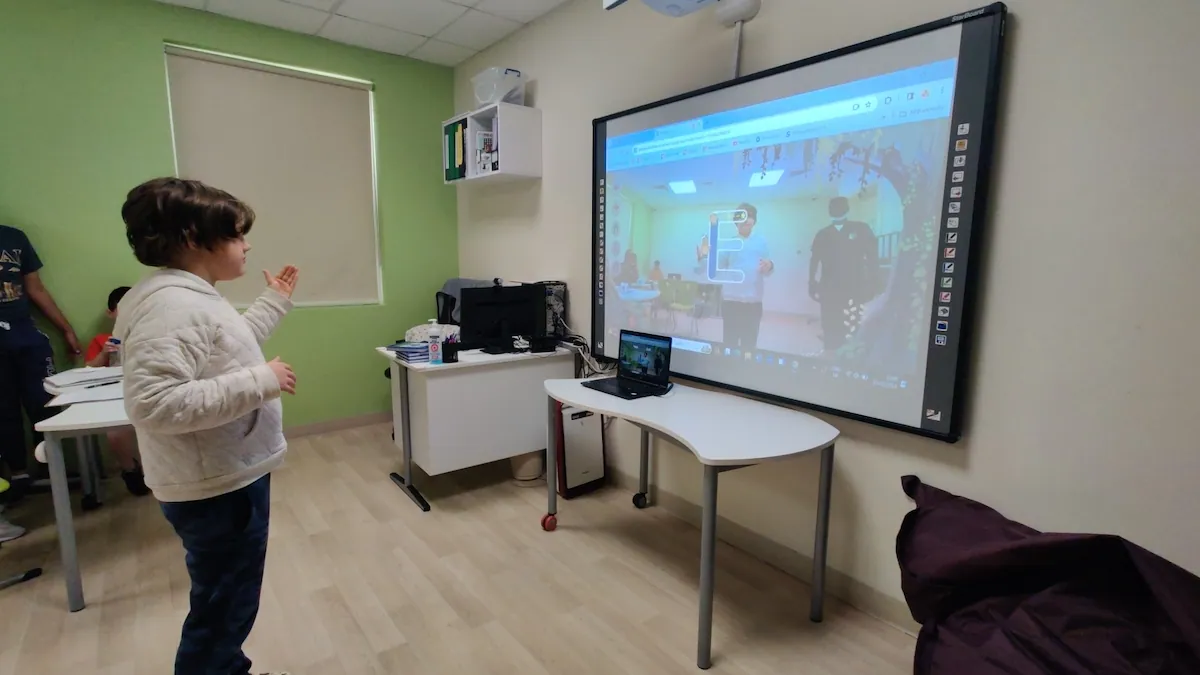
Eye Hand Coordination Activities for Preschoolers
If you specifically need eye hand coordination activities for preschoolers, keep them playful, short, and success-heavy:
- Pop bubbles
- Scarf toss and catch
- Balloon taps
- Large peg boards
- Chunky lacing cards
- Sticker dots on big circles
- Roll and trap a ball (stop it with hands)
- Beanbag toss onto big shape mats
- Playdough “pinch and place” (tiny balls on dots)
- Magnet fishing
- Big-piece puzzles
- Sponge stamp painting
Preschool pro tip: one “big movement first” round (balloon/bubbles) often improves focus for the next “small tool” round (tweezers/stickers).
Bilateral Coordination + Crossing Midline
Many coordination challenges show up when kids need both sides of the body working together.
- Lacing cards
- Tear-and-paste mosaics (tear with two hands, place precisely)
- “Pass Across” relay (move objects left → right in a pattern)
- Ribbon wand figure-8 (track with eyes while drawing big loops)
Use these when kids manage one-handed tasks but struggle with two-hand coordination.
Hand Eye Coordination Games Online (Active, Not Passive)
If you’re searching for hand eye coordination games online, define what “counts”:
- requires timing or targeting (not just watching)
- gives immediate feedback (hit/miss, score, timing)
- short rounds (1–3 minutes)
- repeats the same skill loop so kids can improve
One effective approach for the classroom is WonderGames, which use augmented reality (AR) to turn whole-body movement into coordination tasks. Because the webcam captures gestures to control the game (without recording or saving video), WonderGames work well as a “movement station.”
1. For Targeting & Reaching: Bubble Pop
Just like the offline version, kids must reach out to “pop” soap bubbles on the screen. It requires rapid visual scanning and reaching — the user must judge the distance of the bubble on the 2D screen and map it to their 3D physical reach instantly.
2. For Tracking & Midline Crossing: Scoop’d
A virtual “catch” game where the child moves a bucket left and right to catch falling ice cream scoops. It forces the user to synchronize their eyes (watching the falling object) with their motor output (moving the bucket to the exact spot), often crossing the body’s midline.
3. For Predictive Timing: Astro Blocks
A “breakout” style game where the user moves their hands to control a paddle and bounce a ball to break blocks. Unlike static targeting, this adds a predictive element — the child must anticipate where the ball will go and coordinate their hand movement to meet it.
4. For Fine Motor & Writing Prep: Capital Alphabet Trace
A digital bridge to handwriting where the user controls a cursor with their hand to trace capital letters. It mimics the constraints of writing — forcing the eye to guide the hand along a strict path — but does it in a gross-motor, vertical format that is often less frustrating for struggling learners.
Teacher Tip: Use these as a 5-minute “warm-up” station before sitting down for table work. The large movements in Scoop’d or Bubble Pop can help “wake up” the connection between vision and movement before asking a child to focus on small paper tasks.
A Simple Progress Check (No Testing Vibe)
Track improvement using observable cues during play:
- Accuracy: hits target more often than last week
- Timing: fewer “late” misses
- Control: smoother, less rushed movement
- Endurance: stays engaged for the whole 3–4 minutes
- Transfer: improvements show up in cutting, drawing, building, self-help tasks
You don’t need a formal assessment. A quick note like “hit 6/10 today, 8/10 next week” is enough.
4-Week Classroom Plan (Plug-and-Play)
Week 1: Big targets, slow speed — Balloon taps, scarf catch, bubble pops
Week 2: Targeting + distance control — Beanbag toss, ring toss, wall dot hits
Week 3: Tool control — Tweezers rescue, sticker paths, clip cards
Week 4: Mixed challenge + choice — Kids choose 2 favorites and try to “beat their own score”
Frequently Asked Questions
What are the best hand eye coordination games for kids?
Balloon and ball games for timing, toss-to-target games for accuracy, and tweezers/lacing/sticker activities for tool control. The best activities are the ones you can repeat often with tiny increases in challenge.
Do these games help with classroom skills like cutting and handwriting?
Yes. Coordination supports tool use such as scissors, crayons, and pencils. Research synthesis reports a moderate relationship between handwriting and visual-motor integration (r = 0.29 across 29 studies), making these activities directly relevant to classroom readiness.
Are hand eye coordination games online okay for preschool and kindergarten?
They can be, if they are active and short. Look for games that require movement, timing, and targeting — not just tapping and watching. Pair an online round with an offline center right after to help skills transfer.
How long should coordination activities last?
Keep them short: 3 to 7 minutes. The key is frequency, not duration. A 4-minute micro-game repeated 2 to 3 times a week builds more coordination than a single long session.
How do I track progress without formal testing?
Watch for five observable cues during play: accuracy (hits target more often), timing (fewer late misses), control (smoother movement), endurance (stays engaged the full time), and transfer (improvements show up in cutting, drawing, and self-help tasks). A quick note like “hit 6/10 today, 8/10 next week” is enough.
What is visual-motor integration and why does it matter?
Visual-motor integration (VMI) is the ability to control a tool based on what you see — such as cutting on a line, tracing a shape, or writing a letter. It is commonly treated as a key component of handwriting skill, and research shows a moderate relationship between VMI and handwriting performance.
Was this article helpful?
Written by

Last medically reviewed on May 13, 2026
How we reviewed this article:
- (2023). Fine Motor Development: Using Small Muscles to Grasp and Manipulate Objects ECLKC. https://eclkc.ohs.acf.hhs.gov/school-readiness/article/fine-motor-skills
- (2007). Handwriting Development, Competency, and Intervention Developmental Medicine & Child Neurology, 49(4), 312-317. https://pubmed.ncbi.nlm.nih.gov/17376147/
- (2024). Developmental Milestones: 4 Years and 5 Years CDC. https://www.cdc.gov/ncbddd/actearly/milestones/index.html
- (2024). Visual-Motor Integration and Handwriting: A Meta-Analysis American Journal of Occupational Therapy. https://research.aota.org/ajot
May 13, 2026
Expanded with 30+ offline and online games, 4-week classroom plan, progress tracking, and clinical sources reviewed by Syeda Rida Asad.
March 20, 2025